Choose GA4 when the work depends on Google's advertising integrations or a measurement model shared between a website and an app. Choose Plausible Cloud when the main job is understanding website traffic and goals with a service someone else operates. Consider Plausible Community Edition only when a named person can own the application, its databases and recovery.
This comparison separates three choices: GA4 Standard, paid Plausible Cloud and self-hosted Plausible CE. CE is an AGPL release with its own feature boundary. Buying a server does not make every Cloud feature available. Sources and prices were checked on 26 November 2026; the operating-cost examples are assumptions, not vendor quotes or a benchmark.
Start with the report you actually need
| Requirement | GA4 Standard | Plausible |
|---|---|---|
| Website and app measurement | Event-based properties support both | Evaluate against a website-analytics workflow |
| Google media-platform integrations | A reason to keep GA4 in the shortlist | Do not assume a traffic dashboard replaces an advertising workflow |
| Hosted service | No Standard software subscription charge | Cloud subscription, sized by traffic and feature tier |
| Self-hosted application | GA4 is a Google service | Community Edition, with infrastructure operated by you |
| Funnels and other premium features | Verify the required report and applicable limits | Cloud plan matters; CE excludes marketing funnels and several other premium features |
| A continuing server bill | Not part of running the hosted application | CE needs compute, storage, backups and administration |
Write down three questions before trialling a replacement. For a small publication they might be “which articles bring readers?”, “which sources send them?” and “which outbound links do they use?”. For a business buying advertisements, the questions may involve campaign attribution and conversion workflows instead. Test those questions in the candidate product; comparing a list of dashboard widgets will not settle whether the required report is possible.
A small-site cost model
Plausible's pricing page currently lists Starter at $9 per month for up to 10,000 monthly pageviews and one site, on monthly billing. Growth starts at $14 and Business at $19 at that traffic level. Higher traffic or additional sites can change the plan. The entry figure is therefore a useful baseline for one small site, not a quote for an agency portfolio.
For a CE example, assume $10 per month for the server, $2 for backups and one hour of administration at $40. That gives $52 per month before setup time, tax and incident work. The assumed server price is a budgeting input, not a claim that a $10 machine will handle your traffic. Measure capacity with the actual workload.
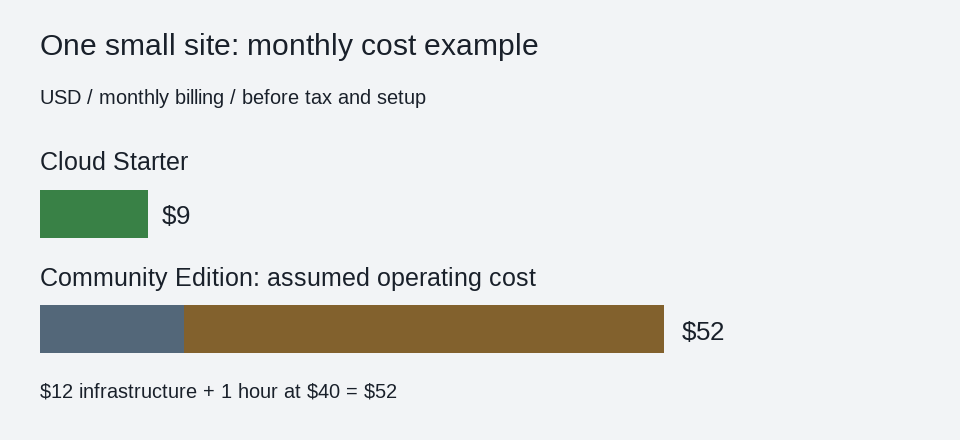
At these assumptions, self-hosting has a higher monthly economic cost even though the software licence has no purchase price. If administration is already funded, or a larger installation changes the hosted quote, repeat the calculation with those inputs. Also budget the one-off installation and a recovery exercise. An hour assigned a value of zero still uses someone's time.
GA4 Standard's subscription cost is zero, but implementing and maintaining measurement can still take time. Keep that work in its own row when comparing options. A quote for implementation, a cloud subscription and a self-hosting estimate are not interchangeable prices.
What Community Edition leaves with you
The CE deployment repository recommends at least 2 GB of RAM and requires a processor with SSE 4.2 or NEON support for ClickHouse. Its Compose setup includes the application and database services. Read the current tagged deployment instructions, keep secrets outside Git and establish how persistent volumes will be backed up before collecting production traffic.
Plausible's edition comparison says CE does not include marketing funnels, user journeys, ecommerce revenue goals, SSO or the Sites API. Those omissions are an immediate decision point for a team that depends on them. Check the actual release you intend to run instead of copying a feature screenshot from Cloud into an internal proposal.
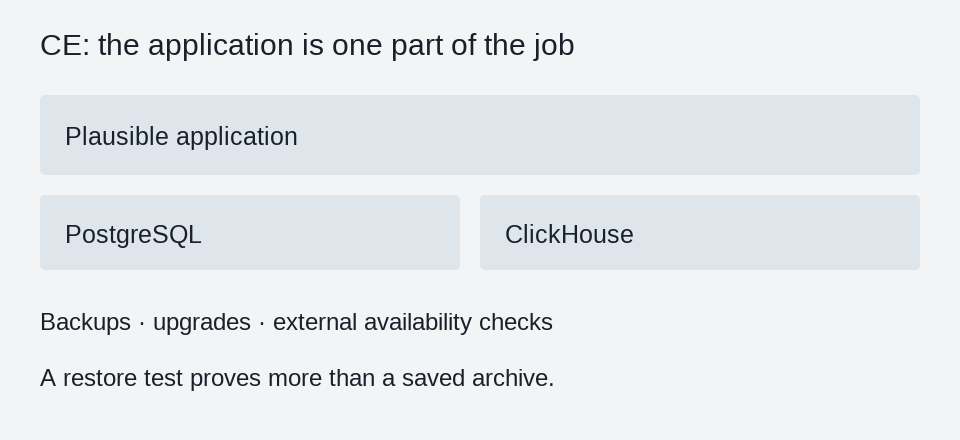
Put the availability check outside the server being monitored. If the server disappears, a checker running on that same server disappears with it. Verify recovery by restoring a backup into a separate environment, checking the historical date range and sending a test event. Keeping a backup file is only one step in that procedure. Our UptimeRobot versus Uptime Kuma comparison covers the monitoring choice.
Moving history has limits
Plausible provides a GA4 importer for historical aggregate reports. Its documentation says an import brings the whole selected GA property; it cannot split that property's history by hostname. A property that previously measured several sites therefore needs particular attention before it is imported into a single Plausible site.
Google's 2- or 14-month retention setting for Standard properties is often misunderstood here. Google says that setting affects user-level and event-level data used in explorations and funnel reports, while standard aggregated reports are unaffected. Plausible's importer reads aggregate reports through the Data API. Do not assume either that every old event will migrate or that all history vanishes at 14 months.
Keep exports needed for existing reports, then compare what the importer actually brings across. Imported totals are not a reconstruction of every original user journey. Check a date range, its source breakdown and the report dimensions your team uses before retiring the old reporting process.
A migration trial with an acceptance check
- Inventory collection. List active tags, events, goals and reports. Include the people and external systems using each report.
- Define a small test. Use one representative site and record its time zone, filters and intended hostname coverage.
- Exercise real actions. Open a page, follow a campaign-tagged link and complete each required goal. Check whether the new dashboard records the intended action once.
- Explain differences. Compare the same dates and scope. Bot handling, collection blocking, consent configuration and metric definitions can produce different totals.
- Decide against the requirements. A different number is not enough to reject a tool; an unexplained missing business event is a reason to investigate before switching.
Review the new collection and privacy disclosures for the actual implementation. A product's privacy claims do not determine every obligation of the site using it. This article compares operating choices and reporting behaviour; it does not certify a site's compliance.
Sources and checks
Checked 26 November 2026. No affiliate links. The two illustrations and the $52 calculation are editorial examples, not measured product performance.